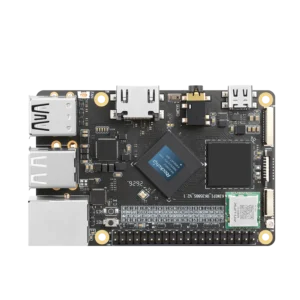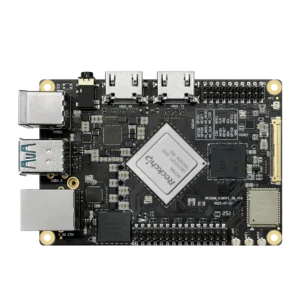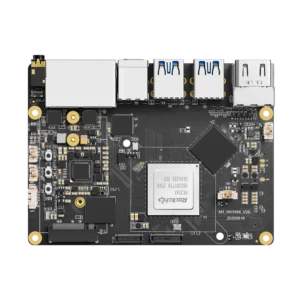


Intel N100 has four x86-64 cores and four threads, with a maximum turbo frequency of 3.4GHz. Rockchip RK3588 has four Cortex-A76 cores and four smaller Cortex-A55 cores, running ARM64 software. We’ve tested server workloads, storage and local language models on KiwiPi hardware. We haven’t run a matching N100 system, so those measurements can show what the ARM board does, without pretending to settle which processor is faster.

Software and containers
An x86-only application gives the N100 a fairly immediate advantage: you can run its native build. Before buying an RK3588 board for an existing server setup, check the packages and container images you actually use. Having Linux in the product description doesn’t answer that question.
For Docker, look for both linux/amd64 and linux/arm64 in the image’s supported platforms. A multi-platform image lets Docker select the appropriate build. An amd64-only image needs an alternative build or emulation on ARM, and emulation adds another dependency to maintain.
Virtual machines need the same check. Hardware virtualization doesn’t turn an ARM processor into an x86 processor; an existing x86 VM image won’t simply become a native ARM guest. If moving those images unchanged is the requirement, I’d start with the N100. Our ARM versus x86 article covers the architecture distinction in more detail.
Eight RK3588 cores also aren’t eight N100 cores. Four are smaller A55s, and software won’t distribute every job evenly across all eight. A single busy application thread, a parallel compile and several independent server processes can produce different rankings. We’d need matched tests to put numbers beside those differences.
Memory and board connections
| Specification | Rockchip RK3588 | Intel N100 |
| Architecture | ARM64 | x86-64 |
| CPU cores and threads | 4 Cortex-A76 + 4 Cortex-A55; 8 threads | 4 cores; 4 threads |
| Integrated GPU | Mali-G610 MC4 | Intel UHD Graphics; 24 execution units |
| Video acceleration | Dedicated decode and encode hardware | Intel Quick Sync Video |
Specifications: Rockchip RK3588 product documentation and Intel N100 processor specifications. These describe the chips; memory capacity and external ports depend on the board.

KiwiPi 5 Pro is one example of what the full RK3588 offers on a board: up to 32GB of LPDDR4X, two 2.5GbE ports, four USB 3.0 host ports and an M.2 2280 slot wired for PCIe 3.0 x4. Our RK3588 hardware guide covers the chip and its interfaces separately.
That RAM is soldered down. Choose the capacity before ordering; you can’t add a DIMM later. Intel lists 16GB for N100, although the memory fitted and validated by the computer manufacturer still needs checking. For either machine, leave room for the operating system, database caches and containers alongside the main application.
And buy the ports you need on the actual board. N100 computers have different Ethernet controllers, storage slots and USB layouts. The processor name doesn’t tell you whether a particular box has two fast network ports, or whether its M.2 connector accepts the SSD you’ve already got.
On KiwiPi 5 Pro, PCIe 3.0 x4 gives an NVMe drive a wider connection than a single PCIe lane. It doesn’t establish file-transfer speed by itself. The SSD, filesystem and network connection still take part in that transfer.
Server workloads and local AI
Web requests and storage
Our single-board server test used a different board: an 8GB KiwiPi 5 with RK3588S, Ubuntu 24.04.3 LTS and Gigabit Ethernet. At 32 concurrent connections, the median was 5,063 HTML responses per second, against 1,481 when requests read 120 history records from SQLite. KiwiPi Server Lab was written specifically for that experiment, not released as a server product.
The hardware stayed the same; the work changed. Those results are useful when planning a similar service. They don’t predict how an N100 will handle the same requests, or how either board will behave with your database.
Storage changed the result substantially in another test. The KiwiPi 5’s eMMC read sequential data at 153.6MiB/s, against 47.0MiB/s for a SanDisk Ultra 32GB A1 microSD card. The operating system stayed on eMMC throughout, so this wasn’t a comparison of two boot installations.
I’d use the eMMC versus microSD measurements when choosing storage for the ARM system, then compare it with the drive fitted to the N100 computer. Comparing an SBC running from a card with a mini PC running from NVMe introduces a storage difference before the CPU gets much of a say.
Video and inference
N100 includes Intel Quick Sync Video. RK3588 has dedicated video decoding and encoding hardware. For a media server, check whether your application can use that hardware under the installed Linux image, including inside its container. Supported codecs on a chip’s specification sheet don’t guarantee an accelerated path in your chosen application.
RK3588 also has a 6 TOPS NPU, with RKNN tools for supported neural networks and RKLLM for supported language models. That gives it another execution option, provided the model converts and the installed runtime matches. N100 can run inference through its CPU or supported iGPU software; the absence of Rockchip’s NPU doesn’t stop local AI.
Our CPU and NPU inference tests show why the runtime deserves attention. On KiwiPi 5, llama.cpp generated Qwen3.5-0.8B at 22.09 tokens/s, against 15.95 through RKLLM for short inputs. The builds used CPU Q8_0 and NPU W8A8, and the CPU stability runs later hit our temperature guard. That’s a software-stack result with limits, not proof that CPUs always beat NPUs—or a prediction for N100.
Power and complete-system cost
Intel’s N100 specifications list a 6W TDP. The complete computer also powers RAM, storage, network controllers and cooling. Likewise, the wattage printed on an RK3588 board’s power adapter tells you its supply capacity, not what the board constantly consumes.
For an always-on server, measure at the wall with the drives and network devices attached. Record idle consumption and the sustained workload you expect to run. A short benchmark won’t tell you what happens after the enclosure warms up.
Include the case, cooling, power supply and storage in the purchase price, too. An assembled N100 mini PC and a bare RK3588 board aren’t equivalent bundles. If your services already have ARM64 builds, compare complete configurations; if they require x86, budget for the machine that runs them natively.
FAQ
Can RK3588 run Docker containers?
Yes, with a suitable Linux image and Docker installation. Check for ARM64 builds of every image in your stack, including smaller supporting services. One amd64-only dependency can change the installation plan.
Is N100 faster than RK3588?
This comparison doesn’t establish a measured winner. Use the same application, comparable storage and memory, and sufficient cooling before drawing that conclusion. Core counts alone won’t settle it.
Which is better for a small NAS?
Check the drive connections, network ports and operating-system support on the exact device. KiwiPi 5 Pro offers dual 2.5GbE and PCIe 3.0 x4 NVMe; an N100 computer needs its own specification check. Neither processor name establishes how many drives you can connect reliably.