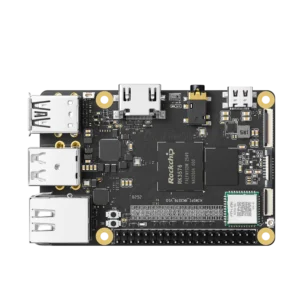


Rockchip RV1126B combines four Cortex-A53 CPU cores, a 3 TOPS NPU and a camera ISP supporting up to 12 megapixels at 30fps, it also encodes H.264/H.265 video at up to 4K45, giving a camera hardware for image processing, inference and recording on one SoC.
I’d evaluate it with the intended image sensor and model before worrying about desktop benchmarks. A camera needs usable frames under its actual lighting conditions, and enough time left to detect an event and save it.

Camera processing and video
Rockchip’s RV1126B product specifications give the main limits below. They’re chip capabilities; the board vendor still chooses the memory, connectors and software image.
| Component | Published RV1126B capability |
| CPU | Four Arm Cortex-A53 cores plus MCU |
| NPU | Up to 3 TOPS |
| ISP and AI-ISP | Up to 12MP30 ISP; 8MP30 AI-ISP |
| Video codecs | H.264/H.265; up to 4K45 encoding and 4K30 decoding |
| Camera connections | MIPI CSI, configured as 2 × 4 lanes or 4 × 2 lanes; DVP |
| Memory interface | 32-bit DDR3/DDR3L/DDR4 or LPDDR3/LPDDR4/LPDDR4X |
| Storage | eMMC 4.51 and SPI flash support |
| Display | MIPI DSI output up to 1920 × 1080 at 60fps |
Start with the sensor driver and ISP tuning supplied for the board. A compatible connector doesn’t establish that a particular sensor has the right exposure control, calibration or image-processing settings. Get a working camera example from the vendor using the sensor you intend to ship.

Rockchip separately lists an 8MP30 AI-ISP mode. Its brief datasheet describes processing aimed at low-light clarity, faces and license plates. For a vehicle entrance, I’d check moving plates at night: noise reduction that produces a cleaner still image can also remove detail that the detector needs. Compare recognition results alongside the pictures.

The 4K45 encoder figure isn’t a promise of 45 detections per second. The model may take a resized frame, and tracking, overlays, recording and network transmission add their own work. Ask which functions can run together at the required resolution, rather than combining independent maximums from a table.
The listed graphics block is a 2D engine. Rockchip documents scaling, rotation and alpha blending, which fit video composition tasks. That gives you no basis for treating this chip like an SBC with a desktop-class 3D GPU.
Models and RKNN tools
A 3 TOPS NPU rating also doesn’t tell you the response time of a camera application. Input size, supported operators, numerical precision and memory traffic all affect what you can run. Our guide to reading NPU performance specifications covers why an operations rating can’t replace a model benchmark.
There’s a software difference worth checking when moving from the original RV1126. Rockchip lists RV1126B under RKNN-Toolkit2, while its instructions send RV1126 users to the older RKNN-Toolkit. Those toolkits aren’t compatible. Reusing the earlier conversion environment just because the chip names look similar can create unnecessary work.
Convert for the RV1126B target, keep the matching runtime and driver versions, then validate the converted model with representative frames. Check missed objects and false detections before measuring throughput. The official RKNN software repository describes the conversion tools, C/C++ runtime and kernel driver as separate parts of the deployment stack.
Rockchip also advertises support for large models up to 2B parameters. That’s a compatibility claim with conditions still to check: the exact model, conversion path, available memory and runtime. Without a measured result for those conditions, I wouldn’t attach a tokens-per-second figure or promise a useful chatbot experience.
Memory and board interfaces
The memory interface supports several DDR and LPDDR types, but the installed capacity belongs to the board specification. Account for frame buffers, the model and application memory together. Leave room for recording and camera buffers alongside the inference workload.
Likewise, USB, Ethernet and display capabilities don’t mean every development board exposes every interface. Check its schematic and connector list. For a finished camera, storage capacity and the network implementation can matter more than an unused display output.
Deployment and host software
During development, models, calibration files and application binaries need to move onto the device repeatedly. If its Linux image includes SSH, rsync and a writable destination, deploying files with rsync avoids recopying an entire project every time you change a few files. Keep generated recordings outside the directory you mirror from the workstation.
That transfers the files; it doesn’t make them compatible. Build binaries for the target userspace and libraries, and keep a versioned set of model, application and configuration files. Stop the relevant service before replacing files it could be reading, then restart it and check the result.
Camera and server
You can also keep the camera and its management software on separate machines. For example, an RV1126B camera could send video and detection events to a KiwiPi server that stores event history or provides a web interface. That arrangement needs a defined stream and event protocol, rather than an assumption that both devices share one application environment.
For that Ubuntu-based server, our instructions for Docker on Ubuntu 24.04 cover installing Engine and Compose. They don’t establish Docker support on the camera itself. An RV1126B firmware image might use a smaller root filesystem, and its vendor kernel still needs the features containers require.
Even on a container-capable image, the NPU driver remains part of the host. A container needs compatible userspace libraries and access to the required devices. Packaging the application doesn’t replace the camera driver, ISP tuning or NPU integration.
If the project needs a broader Linux workstation, several services and substantial expansion, compare complete boards against the RK3588 hardware and interface guide. RV1126B’s camera-oriented blocks are the reason to consider it; four A53 cores alone don’t describe what a general-purpose application will need.
Before committing to hardware, run the intended sensor, model and recording mode together for long enough to reveal dropped frames or thermal limits. Save the software versions with that result. Check the complete pipeline, including the recorded output.
FAQ
Can RV1126B run a Linux desktop?
Check the board’s supplied image and graphics support. Its published 2D graphics engine and 1080p display interface don’t establish the same desktop experience as a board with a 3D GPU. Choose it around the camera workload first.
How much power does RV1126B use?
The RV1126B brief datasheet leaves typical consumption at 8MP30 as TBD. Measure the complete board with its sensor, memory and intended processing active; the document doesn’t provide a finished-device wattage to quote.
Is RV1126B a drop-in replacement for RV1126?
Don’t assume that from the name. Rockchip specifically identifies RV1126B-P as the pin-compatible variant in the brief datasheet. A replacement still needs the relevant hardware compatibility information and a software migration plan.